显示标签为“h.265 box”的博文。显示所有博文

2015年3月31日星期二

Vigica move to New address


Dear All Customer

Vigica move to new address, the details as following:

4th Floor, No.242 Xixiang Road, Baoan District, Shenzhen, China


Map:


Our office


Welcome to our office!


2015年3月18日星期三

Quad core Android tv box with DVB function Vigica C90S and Vigica C90T release to agent for retail

Hello everybody
  
    Quad core Android tv box with DVB function Vigica C90S and Vigica C90T have relase for the agent, welcome to order.
   if you want the small order, please go to Aliexpress, Ebay and Amazon store to get the sample.

    if you want to get OEM and ODM service, please contact us service center.

   Vigica will be always here. 


Quad core Android tv box with DVB function Vigica C90S and Vigica C90T release to agent for retail

2015年1月29日星期四

Vigica V5--20150128 version firmware update


Quad Core Android TV Box 
       Quad core update steps for Vigica V5


If the firmware update, your installation and storage files will lost, Please backup your files before update!

Step 1:
Select the FAT32 mode and Format the TF card

Step 2:
Copy the files (1 & gt; aml_autoscript 2 & gt; factory_update_param.aml 3 & gt; V5-m201-ota-20150128.V0823.zip 4 & gt; recovery.img 5 & gt; u-boot.bin 6 & gt; unlock_autoscript) to TF Card

Step 3:
Unplug the power, Insert the TF card to TV BOX's TF card reader

Step 4:
Plug in the power, Wait 20 seconds will start to update

Step 5:
When the TV BOX reboot, Please remove the TF Card (This step is very important!), And continue to waiting five minutes

Step 6:
The update will completed, Enjoy !!

-------------------------------------------------- ------------------------------------------


Tips:
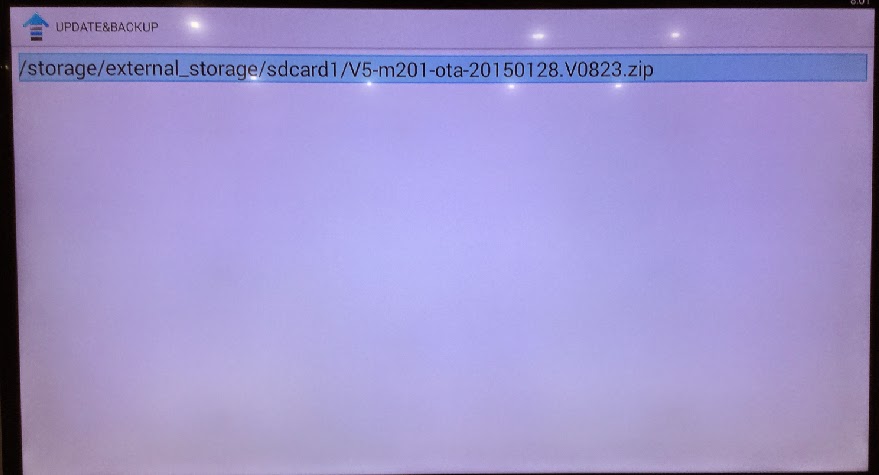
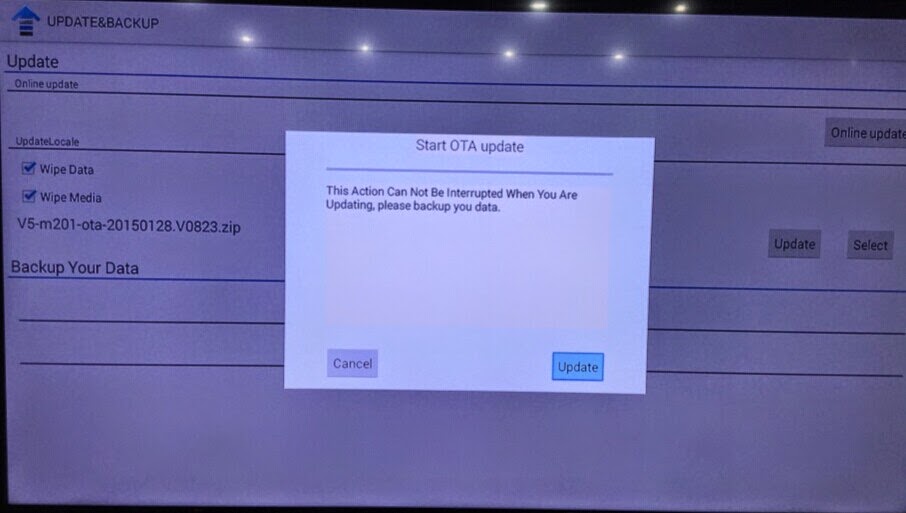
If your tv box can use in android OS, You can copy the files Copy the files (1 & gt; aml_autoscript 2 & gt; factory_update_param.aml 3 & gt; V5-m201-ota-20150128.V0823.zip 4 & gt; recovery.img 5 & gt; u-boot .bin 6 & gt; unlock_autoscript) to TF Card (no folder), & nbsp; Then insert the TF card to TVBOX's TF card reader, Into updateLocal, Select V5-m201-ota-20150128.V0823.zip and update.


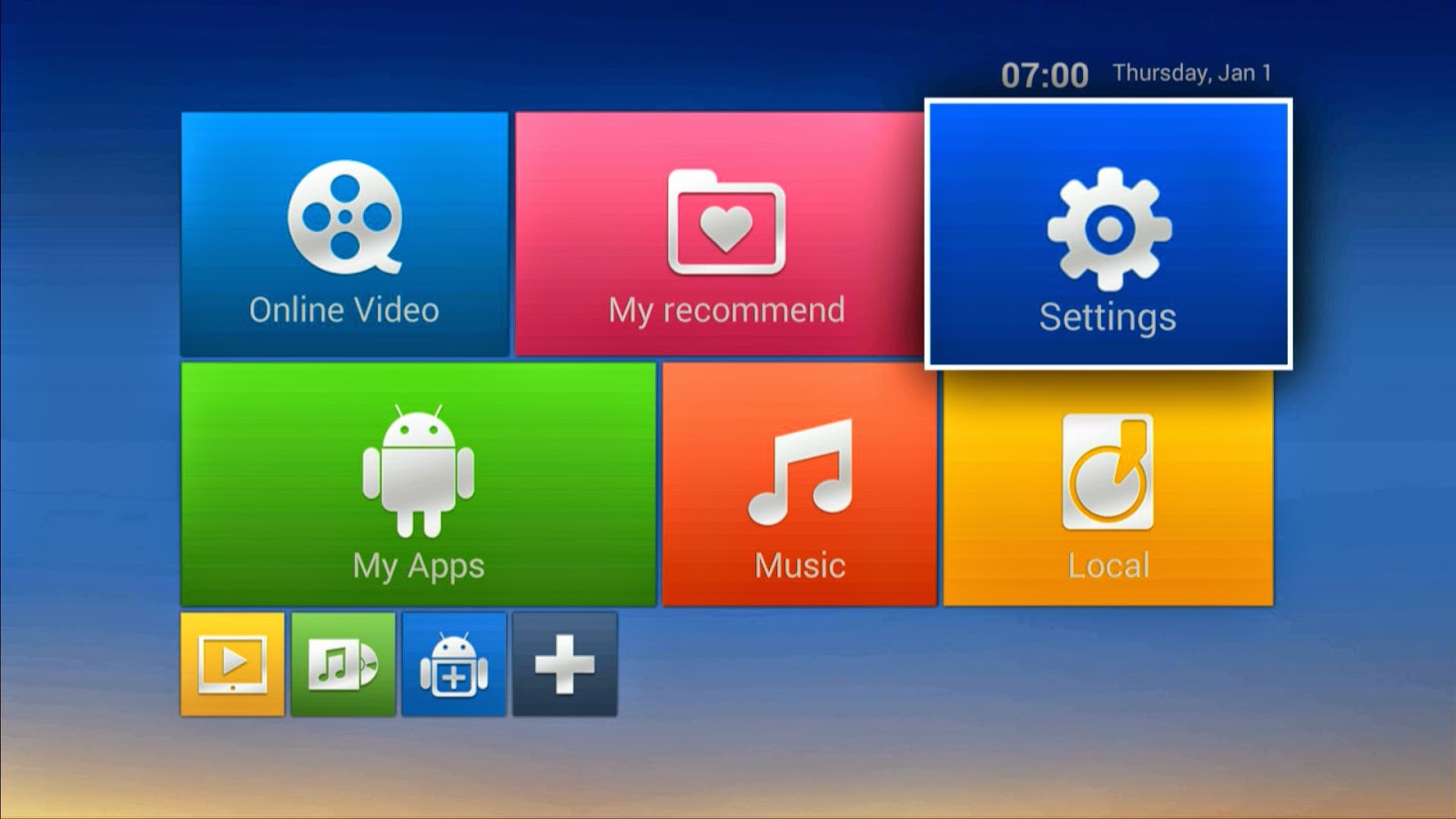
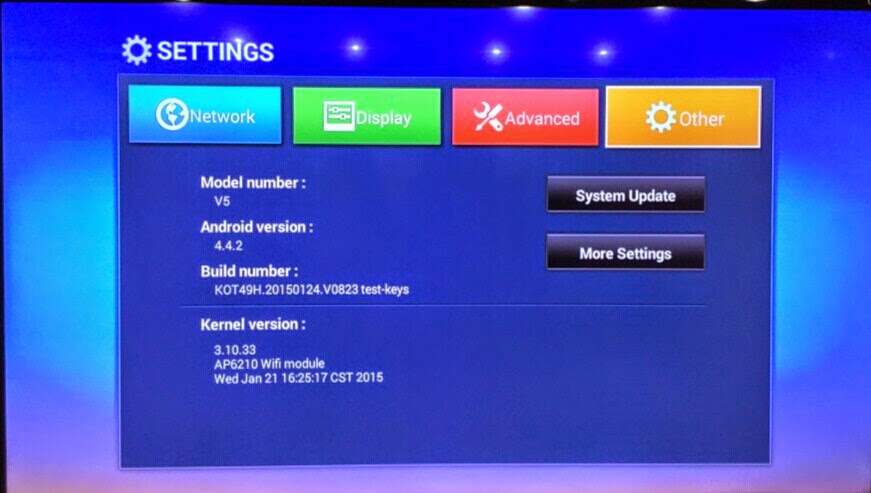
Power on the box, Enter setting


system update


choose the files


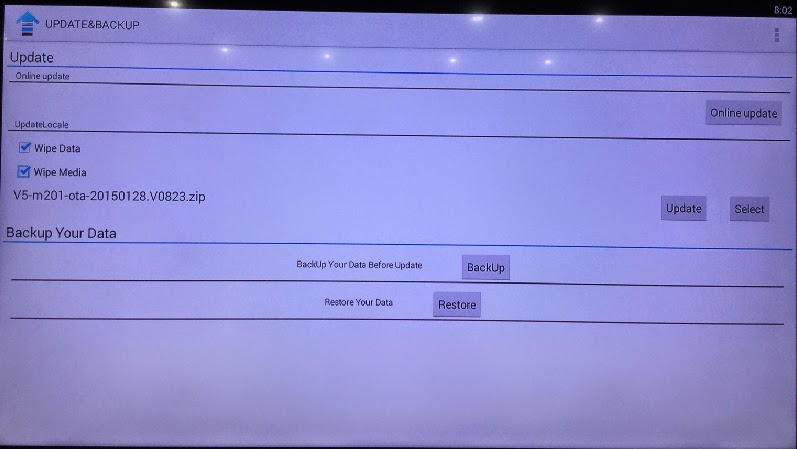
wipe data and wipe media


update


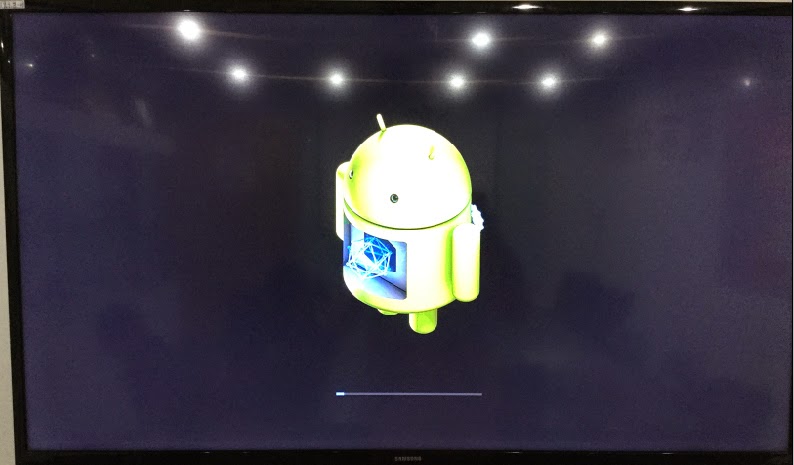
then the box will update automatic, after erasing, please take off the TF card, then the box will restart.


2015年1月28日星期三

Vigica Exhibition in the CSTB 2015 Croscus Expo 2015

Vigica Exhibition in the CSTB 2015 Croscus Expo 2015

Glad to inform you that Vigica now is showing the Android TV Box &DVB in the CSTB 2015 Croscus Expo 2015. If you are interested, be sure to remember to visit our booth 4-900. We are honored to meet you then.


You can see some new models like

Android with DVB-S2 quad core Vigica C90S,

Android with DVB-T2 quad core Vigica C90T:


Vigica attend not only Expo in Russia, also in Hong Kong China Souring Far.

Every April and October of the year, Vigica attend Electronics Expo in Hong Kong, in Guangzhou, Dubai and Russia.


Exhibition always gives Vigica a good resources and the correct direction so that the Vigica Android TV BOX known by most of the world.


If you want know much more about Vigica, you can vigica www.vigica.cc

2015年1月11日星期日

More than one million people hold against terriorism dignitaries in Paris France, nearly about 40 countries attended. Instant News please open Vigica TV box viewing.

More than one million people hold against terriorism dignitaries in Paris France, nearly about 40 countries attended. Instant News please open Vigica TV box viewing.


Yesterday, about 20 million French people gone to the streets, silent procession to being terrorists killed 17 people mourning. Today, more people will take to the streets. French presidential department announced on the 10th, will be held on 
parade for against terriorism in Paris city at 15:00 on the 11th (GMT 22:00), it will be the largest parade in French history with 40 government about 100 million. 

More  instant News, please open the Vigica TV box, In china usually can be CCTV-1 News, ALL News media page, and France News channels to get more. 


Terrist making 3 times attracking in paris, make all french together. saftey is became a whole affair. Let's give an interval of silence to show respect for the dead

2015年1月10日星期六

USB Powerful functions for android smart tv box vigica c60s

USB Powerful functions for android smart tv box vigica c60s


Now, with all kinds of TV boxes, people watch TV with more choices, no longer limited tocable TV. But faced with all kinds of boxes, how to make a sensible judgment and choice is a big problem. Below i will explain the feature of the C60S USB ports, hoping this would help you to choose a box.


Android Smart TV Box C60s have three USB ports. One in front of the box,two behind tv box. Just as the photo showing.This three ports have many ways to read multimedia files. USB plug u disk or removable hard disk, how many there are,how many will on the show,if you have multiple partitions by multiple computing. Of course, you can operation related video, audio and photo directly,then play it respectively.


There can insert a usb wireless receiver,using the wireless air mouse to control the tv box.


You can insert a u disk,to see your photo,listen music or see the video. You can find your u disk on the file brower to check your file.


Or you can see your photo from picture player,go into the picture you will see that.


You also can listen music from musicplayer.


You can record the video you,save and play it any time.


Application examples discussed in this paper shows that C60s tv box are able to through the USB
interface to control functions based on Android.


Vigica C60S/C70S Android with DVB-S2 support CCCam, Newcamd

Vigica C60T/ Vigica C70T Android with DVB-T2, Russia, Thai support

Vigica C70A Android with ATSC tuner for North American(Canada, USA,Mexico, Korea)

Vigica C90S Android with DVB-S2 CCCam, Newcamd Quad Core TV box

Vigica C90T Android with DVB-T2 Quad Core DVB-T2 box

Vigica V3, RK3288 4K Video Quad Core TV box

Vigica V5, S805 Quad Core TV Box

Vigica VG328, RK3288 Mini PC. Fly Mouse Ipush Dongle

http://vigicaiptvbox.blogspot.com/

http://www.facebook.com/vigicaiptvbox

More details please check www.vigica.cc

2015年1月9日星期五

No zuo you die, fighting against maybe wont be success, but if you do nothing, everything will go to dead

No zuo you die


Everyone will meet more affairs, you will be choosed active or passive. it seems you choose everything, but in fact you have been wreathed to the life.

what happened in your 2014 life? get more , or lose more.

Now let's go back to learn more about vigica's 2014.

February, Vigica post out Vigica M4,it use Allwinner A31S chipset, it is hd smart tv box, each box included more Chinese channels. the customer can watch TV, movies online at any times. 

April, the first generation Android with DVB-T2 tv box is coming out, Vigica C6 is based on Amlogic 8726-MX. it is a important step to open the market for Combox.
May,we have post out Vigica VG968 , Rockchip 3188, Quad core TV Box


July, the second generation Android tv box with DVB-T2 Vigica C60T&C70T, get more Customer inquiry.


At the same, Vigica post out Vigica C60S and C70S, android with DVB-S2, also support CCCam, newcamd, this function making out, customer is live up, cant resist their patience.


August, meeting north american customer's inquiry, we post one Android with ATSC tv box.  


and then we make Vigica V3 and Vigica V5, two Quad core tv box. 


December, we are prepared for Vigica C90, it based our Vigica V5 box, S805 Quad core TV box, it will add DVB-S2 and DVB-T2, it will have more improvement from Vigica C60S and Vigica C70S. let's make more patient for it.


In a whole year, Vigica is making more effort to do more wonderful box. Vigica TV box give more surprise for customer, also get more high feedback. but also meet some problem, thanks for all customers support.

In 2015 years, All Vigica's will take the heart to service every customer, post out more wonderful highly-effective products. if you have any suggestions to Vigica, you can email to us info@vigica.cc. 

Usually we will reply you in 24 hours. 


Vigica C60S/C70S Android with DVB-S2 support CCCam, Newcamd

Vigica C60T/ Vigica C70T Android with DVB-T2, Russia, Thai support

Vigica C70A Android with ATSC tuner for North American(Canada, USA,Mexico, Korea)

Vigica C90S Android with DVB-S2 CCCam, Newcamd Quad Core TV box

Vigica C90T Android with DVB-T2 Quad Core DVB-T2 box

Vigica V3, RK3288 4K Video Quad Core TV box

Vigica V5, S805 Quad Core TV Box

Vigica VG328, RK3288 Mini PC. Fly Mouse Ipush Dongle

http://vigicaiptvbox.blogspot.com/

http://www.facebook.com/vigicaiptvbox

More details please check www.vigica.cc

2015年1月8日星期四

how to install XBMC skin plug in your vigica android smart tv box?


Install the XBMC skin plug-in for your Vigica Android TV Box

usually each android tv box have installed XBMC media center, but some customer maybe meet some problems how to use this plugs, also add-ons, now let me check more about skin firstly 


Install XBMC skin plug-in for your Vigica Android TV Box


1. Enter to XBMC and Click System Setting:


2. Find the users interface:


3. Enter to Skin:


4. Click obtain:


5. Stay for a while in the skin title so that the style preview shows up:


6. Click to install:


7. Download plug-in:


8. It will automatically remind you to install after completed download:


9. Return to see the effect, the interface looks amazing. :)


10. HDP live:


11. PIP preview:


Vigica C60S/C70S Android with DVB-S2 support CCCam, Newcamd

Vigica C60T/ Vigica C70T Android with DVB-T2, Russia, Thai support

Vigica C70A Android with ATSC tuner for North American(Canada, USA,Mexico, Korea)

Vigica C90S Android with DVB-S2 CCCam, Newcamd Quad Core TV box

Vigica C90T Android with DVB-T2 Quad Core DVB-T2 box

Vigica V3, RK3288 4K Video Quad Core TV box

Vigica V5, S805 Quad Core TV Box

Vigica VG328, RK3288 Mini PC. Fly Mouse Ipush Dongle

http://vigicaiptvbox.blogspot.com/

http://www.facebook.com/vigicaiptvbox

More details please check www.vigica.cc