显示标签为“Mexico Atsc android box”的博文。显示所有博文

2015年2月3日星期二

VIGICA Android TV Box offer the special Chinese Spring Festival Day for you

Chinese New year is coming, whole country are in exciting. All people will have a long holiday. 

Watching Hotest and Newest show By VIGICA HD Android TV Box

Wu - the only female emperor in Chinese orthodox history

With the hit of Wu Mei Niang legend,more and more people get know this
Legendary Women.

She is the country's history as the first and only female emperor. Wu preliminary ruling, reuse Ruthless, crack down against his veteran minister, Hoon your old family, this break Han Control Council, senior officials of the monopoly situation. Nearly half a century before the ruling, deck, "Golden Years", the next start, "Kaiyuan Spirit", known as "Golden Years legacy" historical achievements, Visible world. The "feudal era outstanding female politicians."


Wu is is good at manage, attention to recruit talent, the first "successful candidates" imperial examination system, and Personnel, can reuse Di Renjie, Zhang Jianzhi, Huan Yan Fan, Jing Hui, Yao Chong Ming Chen, such as ZTE. During Wu ruled countries, policy reliable, Binglue properly, cultural revival, wealthy people, it is "Golden Years legacy" in the world, but also for the treatment of Kaiyuan Sun Emperor laid the foundation for long-term stability.

You can watch this program by VIGICA HD Android Smart TV Box.
More information,go and click www.vigica.cc

2015年1月13日星期二

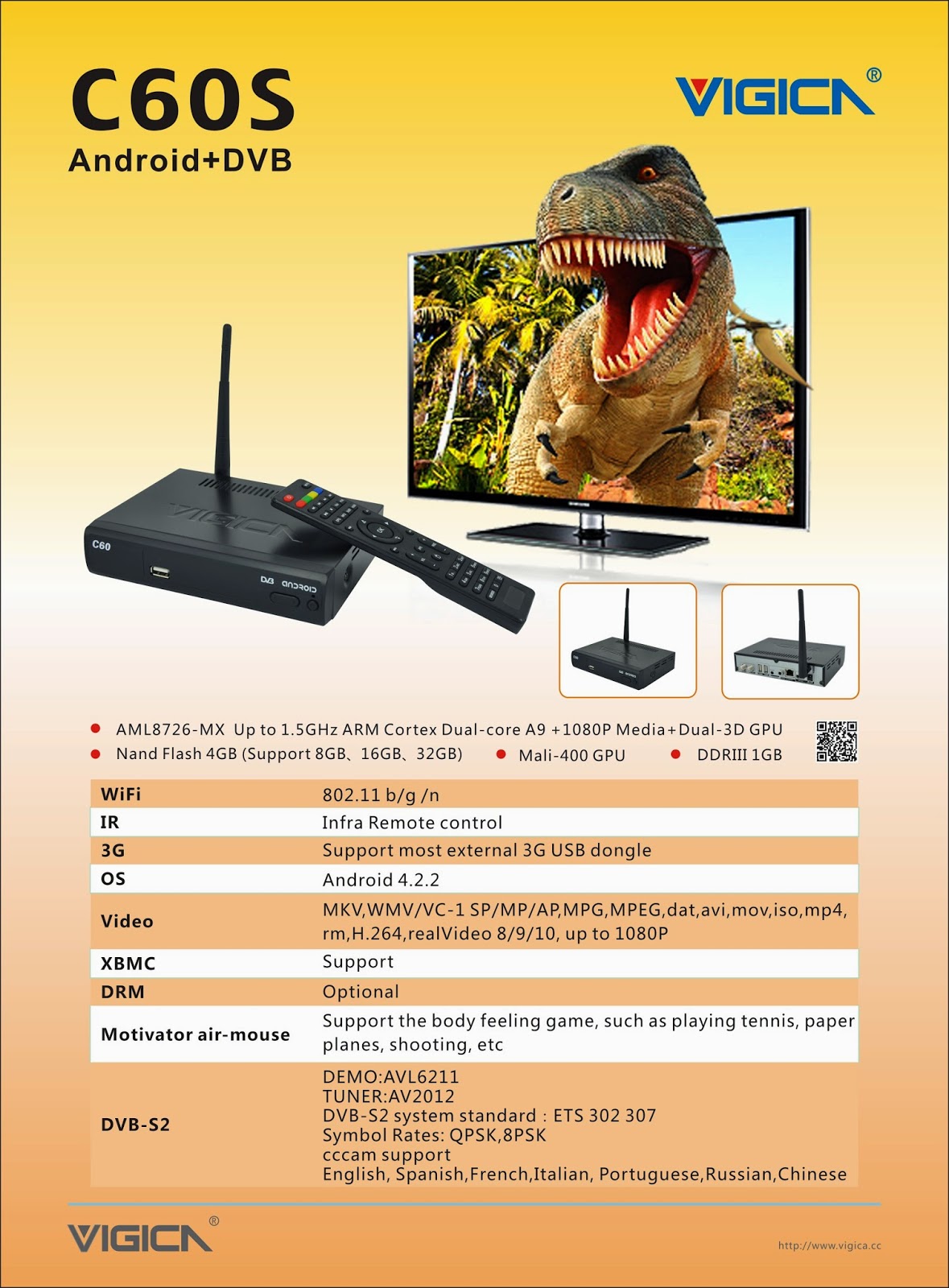
Smart tv box DVB S2 to Update firmware of Vigica C60S/C70S, Enjoying!

About Newest Update for Vigica Smart TV Box C60S DVB-S2

About Newest Update for Vigica Smart TV Box C60S DVB-S2

Last Week, we have already posted out the New firmware for Vigica C60S and C70S DVB-S2 CCCam box.


the Details please read here:

Update steps:

Method 1
( Usually, the box cant open normally, cant power on, and you want to make a fixed MAC to the box, please use this method)

   Format the SD card, then put the files and upgrade tools in SD card directly, then Connect the HDMI Cable with Vigica smart box and TV, Insert the SD card to the vigica box, Power on the vigica box, then the box will enter into upgrade system, please dont power off the system, after the box showing erasing, please take off the SD card from the vigica smart box. some seconds later, the box will tell you to input the MAC address by Scaaing or keyboard, after do that, please restard the Vigica box system, the box will auto restart again. update is finished.

Step 1:     Start update

Step2:  Insert the SD card and connect HDMI cable

www.vigica.cc/products/hd-android-smart-tv-box-dvb-s2-android-vigica-c60s.html

Step 3:  Power on the box
www.vigica.cc/products/hd-android-smart-tv-box-dvb-s2-android-vigica-c60s.html

 Step 4: the box will go enter update auto itself
www.vigica.cc/products/hd-android-smart-tv-box-dvb-s2-android-vigica-c60s.html

Step 5:  the front panel showing
www.vigica.cc/products/hd-android-smart-tv-box-dvb-s2-android-vigica-c60s.html


Step 6:  after the box showing erasing
www.vigica.cc/products/hd-android-smart-tv-box-dvb-s2-android-vigica-c60s.html


Step 7: take off the SD card
www.vigica.cc/products/hd-android-smart-tv-box-dvb-s2-android-vigica-c60s.html


Step 8: about 30 seconds, the box will restart

www.vigica.cc/products/hd-android-smart-tv-box-dvb-s2-android-vigica-c60s.html


Step 9:  first entering system after update
www.vigica.cc/products/hd-android-smart-tv-box-dvb-s2-android-vigica-c60s.html


Step 10:   update is success
www.vigica.cc/products/hd-android-smart-tv-box-dvb-s2-android-vigica-c60s.html


Methods 2

( if you just want to update the bugs, the box can work well, please use this one, this methods wont tell you to write down the MAC)

Put the files to the USB or SD card  (Please note: only the Vigica files in USBor SD card  directly)

Power on the Vigica smart box firstly, after enter the main interface, Insert the USB or SD card to the vigica box, then go inside all apps-----Local upgrade, the box will read the data from USB or SD card, choose that files, the vigica Box will go to update by itself, then restart .

Step 1: power on the box, enter the application


Step 2: Insert SD card or USB to the box 

Step 3: choose local upgrade 

  Step 4: choose the firmware, press ok.


Step 5: the box will go entering update, then restart again.

the update will be finished. more details can check ww.vigica.cc


http://www.vigica.cc/products/hd-android-smart-tv-box-dvb-s2-android-vigica-c60s.html

http://www.vigica.cc/products/hd-android-smart-tv-box-dvb-s2-android-vigica-c60s.html


Vigica C60S/ Vigica C70S Android with DVB-S2 support CCCam, Newcamd

Vigica C60T/ Vigica C70T Android with DVB-T2, Russia, Thai support

Vigica C70A Android with ATSC tuner for North American(Canada, USA,Mexico, Korea) 

Vigica V3, RK3288 4K Video Quad Core TV box 

Vigica V5, S805 Quad Core TV Box

Vigica VG328, RK3288 Mini PC. Fly Mouse Ipush Dongle

http://vigicaiptvbox.blogspot.com/ 

http://www.facebook.com/vigicaiptvbox

More details please check www.vigica.cc

2014年12月19日星期五

Android ATSC Vigica c70A smart tv box special for North America market

Based on tradition dvb and android products, Vigica's engineer developed this two parts in one box, that is now popular android dvb, android atsc box, 


Today i would like to bring more information for USA, Mexico, Canada market, android atsc from www.vigica.cc is ready for you, are you ready to test it?  


 Please check more about Vigica C70A


VIGICA C70A ATSC+ Android Box  Aml8726-mx Android 4.2.2 Dual Core  A9 IPTV Box 1080p HD Media Player  1G 4G WIFI XBMC 3D GPU


http://www.vigica.cc/products/new-product-c70a-android-media-palyer-atsc-aml8726-mx-tv-box.html


VIGICA C70A has been a favorite android boxes in ours company since we created 
this box!So, we were very excited when VIGICA C70A    coming up in 2014 ,you’ll find something
 on VIGICA company that you’ll love.Well, it's time to show you one of the favorite 
boxes from VIGICA- C70A


it is slin and handy, nice design.

Vigica C70A is Android with ATSC standard tuner, based on Amlogic 8726-MX chipset,

The AML8726-MX is the Dual-core A9 and 1080P Media, Dual-3D GPU found in popular streaming 
boxes.The more is DDRIII 1GB and Nand Flash 4GB. This box  include a Wi-Fi connection allow for 
maximum network flexibility and stability.

VIGICA C70A, Android 4.2.2 System, it offers services for all the major 


streaming services like Netflix, Hulu Plus,Flixster , youtube etc. VIGICA C70A with several language support for many countries like United State,England,Spain,Russia,Germany,Korea and so on.It's really a multifunction box with sleek design that looks sophisticated enough to look at home.